
Sending from your own email domain
How to Set Up Sending Emails From Your Own Domain
You can send emails from your own custom domain (e.g., forms@yourdomain.com) by verifying the domain inside Zentake. This improves deliverability and ensures messages come directly from your organization.
This guide walks you through the full setup process.
Overview
To enable sending emails from your domain, you’ll complete two steps:
- Add your domain in Zentake
- Update DNS records with your domain host (GoDaddy, Cloudflare, Namecheap, etc.)
Once all DNS records are active, your domain will be verified and ready to send email.
Step 1 — Add Your Domain
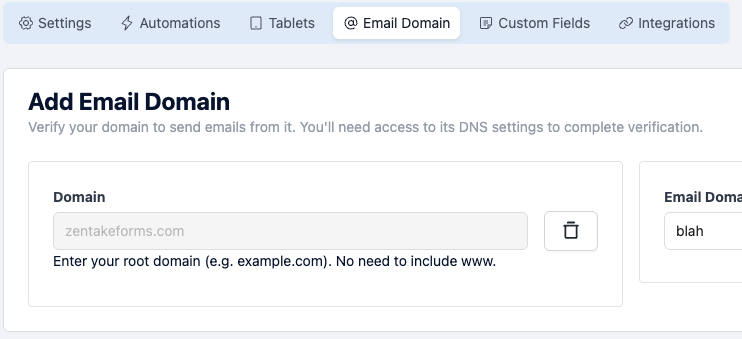
- Navigate to Settings → Email Domains inside Zentake.
- Click Add Email Domain.
-
Enter the domain you want to send from
Example: yourdomain.com (do not add the www.)
-
Choose a prefix, which becomes the “from” email.
Example: entering forms will create forms@yourdomain.com
- Click Save.
Step 2 — Update Your DNS Records
Where to add DNS records
Log in to your domain registrar (e.g., GoDaddy, Cloudflare, Google Domains, Namecheap).
Go to the DNS Management area and create each record exactly as shown in Zentake.

Step 3 — Verify Your DNS
Once all records have been added:
- Return to the Email Domain page in Zentake.
- Click Verify.
Each DNS record will display a status.
When all records show Active, your domain is fully verified.
What Happens After Verification?
Once your domain is verified:
- All outgoing emails sent from Zentake will use your custom domain.
- Your email reputation and deliverability improve.
- You can manage multiple email prefixes under the same domain if needed.
Troubleshooting
Records not showing Active
Most issues come from:
- A typo in the host or value fields
- Missing records
- Incorrect record type
- DNS propagation delay
Double-check each field exactly as Zentake provides.
My registrar doesn't accept the domain format
Some platforms require adjustments:
- For CNAME records: remove the trailing dot (
.) if your registrar doesn’t support it. - For Name/Host fields: try leaving it blank or using
@if the registrar auto-formats it.
Need Help?
If you're having trouble getting your domain to verify, reach out to support and include:
- A screenshot of your DNS records
- Your domain name
- The time you added the records
We can help you identify which record still needs attention.