
Using Variables in Email & SMS Invites
Variables allow you to automatically insert patient details into your email and SMS invites/messages sent to patients.
This helps personalize communication and ensures each patient receives accurate, relevant information when completing their forms, packets, or documents.
What Are Variables?
Variables are placeholders that automatically pull in data when a message is sent.
Instead of saying:
“Hello”
You can write:
“Hello {{first_name}}”
When the invite is sent, Zentake replaces the variable with the patient’s actual information.
Where Variables Are Used
Variables can be used in:
- Email invites
- SMS (text message) invites
- Reminder messages
How to Customize Invite Messages
Step 1: Navigate to Invite Settings
- Go to Settings
- Locate Global Invite Settings

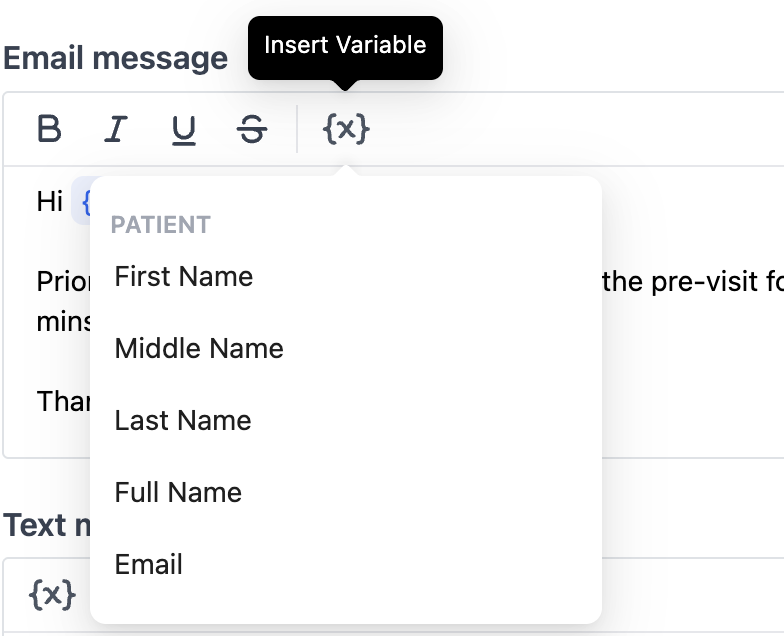
Step 2: Insert Variables
- Place your cursor where you want dynamic data
-
Use the variable selector to select the wanted variable
Additional Note
These same steps can also be used to customize reminder messages and form or packet-specific invites, allowing you to tailor communication at both a global and individual level.
If you need help customizing your invite messages, contact Zentake support.