
Advanced Feature: Functions
Functions let you add more flexibility and intelligence to your forms. They can help you count responses, perform calculations, apply conditional logic, combine responses, or automatically calculate values like age.
You can use functions inside any calculation field by typing them directly into the formula editor.
Create a Function
- Create a Calculation question.
- Click the function icon in the equation field.
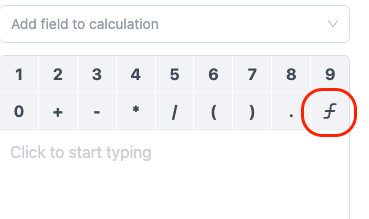
Below are the currently supported functions in Zentake.
1. COUNTIFS
Counts how many fields in a given range match a specific value.
Format:
COUNTIFS(initial_range : end_range; value)
Example:
COUNTIFS(Q1:Q10; "Yes")
Counts how many responses between Question 1 and Question 10 are marked “Yes”.
2. IF
Adds conditional logic to your calculations. The IF function can evaluate numbers or text choices and return a different result depending on whether the condition is true or false.
Format:
IF(condition; when_true; when_false)
Example:
IF(Q1 > 5; "High"; "Low")
If the answer to Question 1 is greater than 5, the result will show “High”; otherwise, “Low”.
Use IF with SUM
IF can also be combined with other functions, such as SUM, to create more advanced calculations.
IF(Q1 = "Yes"; SUM(Q2:Q5); 0)
If Question 1 is "Yes", the values from Questions 2–5 are added together. Otherwise, the result is 0 .
Use IF with text concatenation
IF can also be used to conditionally combine text responses.
IF(Q1 = "Yes"; Q2 & " " & Q3; "Not applicable")
If Question 1 is "Yes", the responses from Questions 2 and 3 are combined. Otherwise, the result will show "Not applicable".
3. AGEDETAIL
Calculates a person’s age from a date field.
Format:
AGEDETAIL(date_field, only_number, include_months)
Example:
AGEDETAIL(Q1, true, false)
If Question 1 contains a birthdate, this function returns the person’s age in years.
Parameters:
only_number– set totrueto show only the number (e.g.,25).include_months– set totrueto include months (e.g.,25 years 3 months).
Combining Functions
Functions can be combined to create more advanced calculations. For example, you can use IF with SUM, or use IF to conditionally return text or combine responses.
This allows you to build calculations that respond dynamically to the answers entered into your forms.